Solzet TagIt
FreeA modern tagging control for Power Apps and Dynamics 365 model-driven apps.
Solzet TagIt is a free PCF control that gives Power Apps and Dynamics 365 model-driven apps a modern way to tag records. Users add, remove and manage tags with type-ahead autocomplete, and each tag can carry a custom color that reflects business logic or priority. Built-in validation prevents duplicate tags, malformed input and inconsistent categorization, while ARIA labels and keyboard support keep the control accessible. Tags are stored as comma-separated values. TagIt suits sales teams, support and case management, project and resource management, healthcare and compliance, and any organization modernizing its Dynamics 365 forms. The control is free to download from this page and needs no licence.
What does Solzet TagIt do?
Add, remove, and manage tags with type-ahead autocomplete, custom colors, and built-in validation. Tags are stored as comma-separated values.
What problems does Solzet TagIt solve?
TagIt solves critical challenges:
- Data Quality Issues: Built-in validation prevents duplicate tags, malformed input, and inconsistent categorization
- Poor User Experience: Provides smooth animations, intuitive interactions, and visual appeal that native Dynamics 365 lacks
- Accessibility Gaps: Includes ARIA labels and keyboard support for inclusive workflows
- Rigid Styling: Customize tag colors to match business logic or priority levels without extensive customization
Where can you use Solzet TagIt?
What does Solzet TagIt look like in use?
Browse through screenshots and watch the demo video
Download Solzet TagIt
This control is free to use. No license required!
How do I install and configure Solzet TagIt?
Setup takes a few minutes in the Power Apps maker portal. No code, no developer tools.
- 1
Get the solution package
- Download the Solzet TagIt solution package (.zip) from this page. Keep it zipped: Power Apps imports the .zip as it is.
- 2
Import it into your environment
- Sign in to make.powerapps.com and pick the target environment in the top right corner.
- Open Solutions, select Import solution, choose Browse, pick the .zip and select Next, then Import.
- Wait for the "imported successfully" message. Importing needs the System Administrator or System Customizer role.
- 3
Add Solzet TagIt to a form
- Open Tables, your table, Forms, and open the main form in the form designer.
- Select a Single line of text column that will store the tags on the form. If it is not on the form yet, drag it in from Table columns first.
- In the Properties pane on the right, expand Components, select + Component and choose Solzet TagIt. If it is not listed, select Get more components and add it from there.
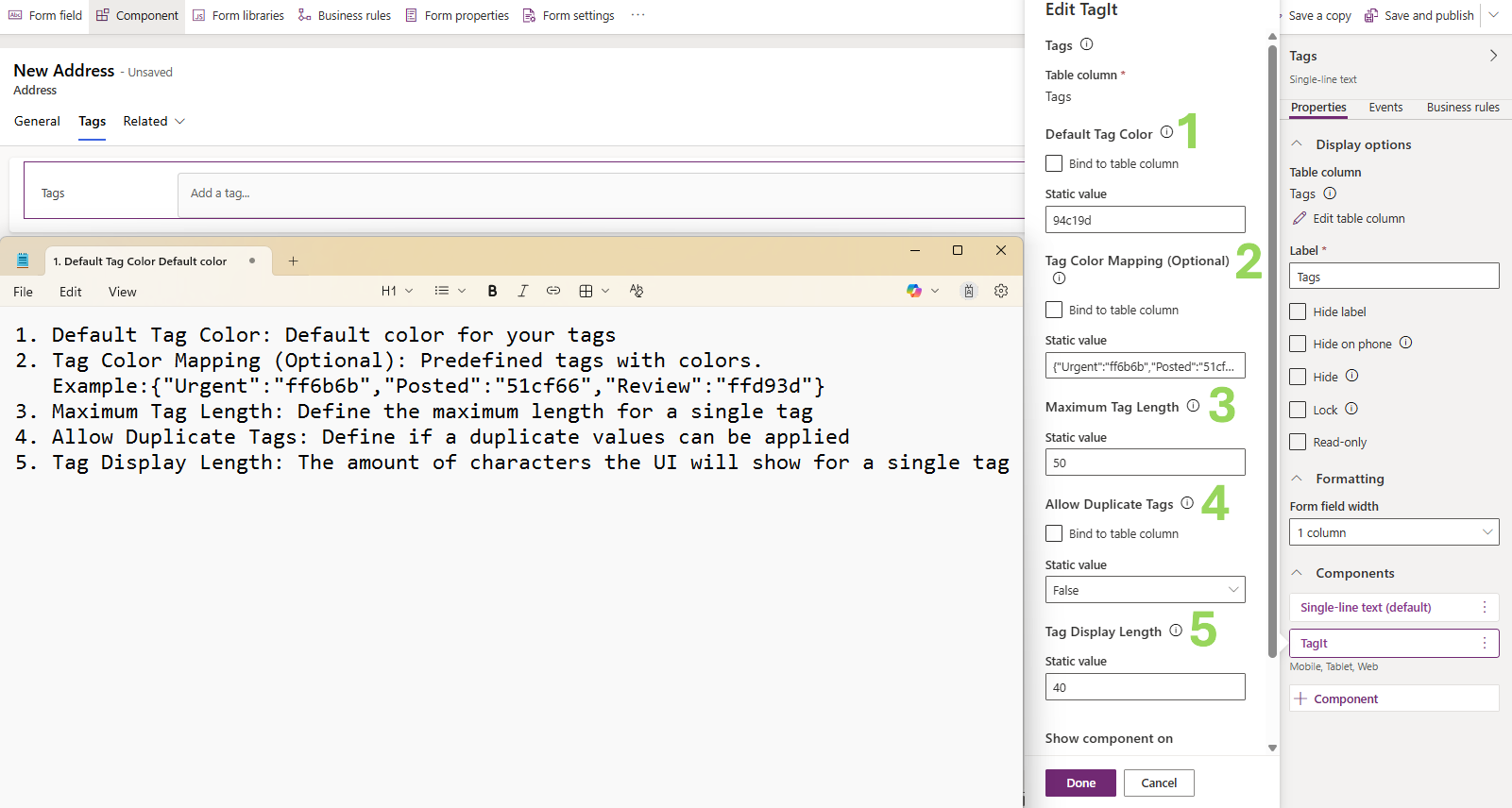
- Set the properties below, tick where it should show (Web, Phone, Tablet) and select Done.
- 4
Save, publish and test
- Select Save and publish, then open a record. If the old control still shows, refresh the page with Ctrl+F5 to clear the cached form.
- To update later, import the newer .zip the same way. Power Apps upgrades the existing solution and keeps your form settings.
Which properties do I set?
| Property | What to set |
|---|---|
| Tagsrequired | The Single line of text column the tags are saved to, as comma-separated values. |
| Default Tag Color | Background color for every tag, as a hex code without #, for example 94c19d (the default, a light green). |
| Tag Color Mapping (Optional) | JSON that gives specific tags their own color, for example {"urgent":"ff6b6b","completed":"51cf66"}. Tags not listed use the default color. |
| Maximum Tag Length | Most characters one tag may have. Default 100; 50-200 is recommended. |
| Allow Duplicate Tags | Leave on No (the default) so users are told when they try to add a tag twice. |
| Tag Display Length | Characters shown before a tag is shortened with an ellipsis; the full text shows on hover. Default 40. |
Good to know
- Make the text column long enough for all the tags a record may carry, since they are stored together in one value.
Using Solzet TagIt? Tell others how it works for you.
Once it has been on your forms for a while, a short review on Clutch about how the control performs helps other Dynamics 365 teams decide, and tells us what to improve next.
What do buyers ask about Solzet TagIt?
What does Solzet TagIt do?
TagIt is a tagging control for Power Apps and Dynamics 365 model-driven apps. Users add, remove and manage tags with type-ahead autocomplete, custom colors and built-in validation, with smooth animations and intuitive interactions that the native Dynamics 365 field does not offer.
How does TagIt store tags?
Tags are stored as comma-separated values in the field the control is bound to. The control handles adding, removing and validating tags on the form, and the stored value stays a simple list of tags.
How does TagIt improve data quality?
Built-in validation prevents duplicate tags, malformed input and inconsistent categorization, so the tags users enter stay clean and comparable across records.
Is TagIt accessible to keyboard and screen reader users?
Yes. TagIt includes ARIA labels and keyboard support so tagging works in inclusive workflows, not only with a mouse.
Is TagIt free, and how do I install it?
Yes, TagIt is free to use and no licence is required. To install it, download the solution package (.zip) from this page, import it through Solutions in the Power Apps maker portal, then add the control to the field in the form editor. If you need help with deployment or a variation of the control, use the form on this page.
Which Solzet services go with Solzet TagIt?
We recommend the right solution - whether that's Microsoft Dynamics 365, Power Platform, or a custom-built CRM. Some businesses need the Microsoft ecosystem. Others need full control without licensing. We deliver both.
PCF Controls Development - PowerApps Component Framework
PCF controls development for Dynamics 365 and Power Apps in TypeScript and React, with a guide to PCF vs JavaScript, the lifecycle and third party libraries.
Power Platform Consulting and Development Services
Power Platform consulting and development by senior Solzet developers: Power Apps, Power Automate and RPA, Power Pages, Copilot Studio, Dataverse and PCF.
Hire a Dynamics 365 Developer or CRM Developer in Armenia
Hire a senior Dynamics 365 developer or CRM developer from Solzet in Yerevan, Armenia: Dataverse, C# plugins, PCF controls, integrations and project rescue.
Need help implementing Solzet TagIt?
Tell us how you want to use this control. A senior consultant replies within one business day about installing it, configuring it for your forms, or building a custom PCF control for a requirement it does not cover.