Number Year Selector
FreeA year-picker dropdown for Whole Number columns in Dynamics 365 and Power Apps - no typing, no comma formatting.
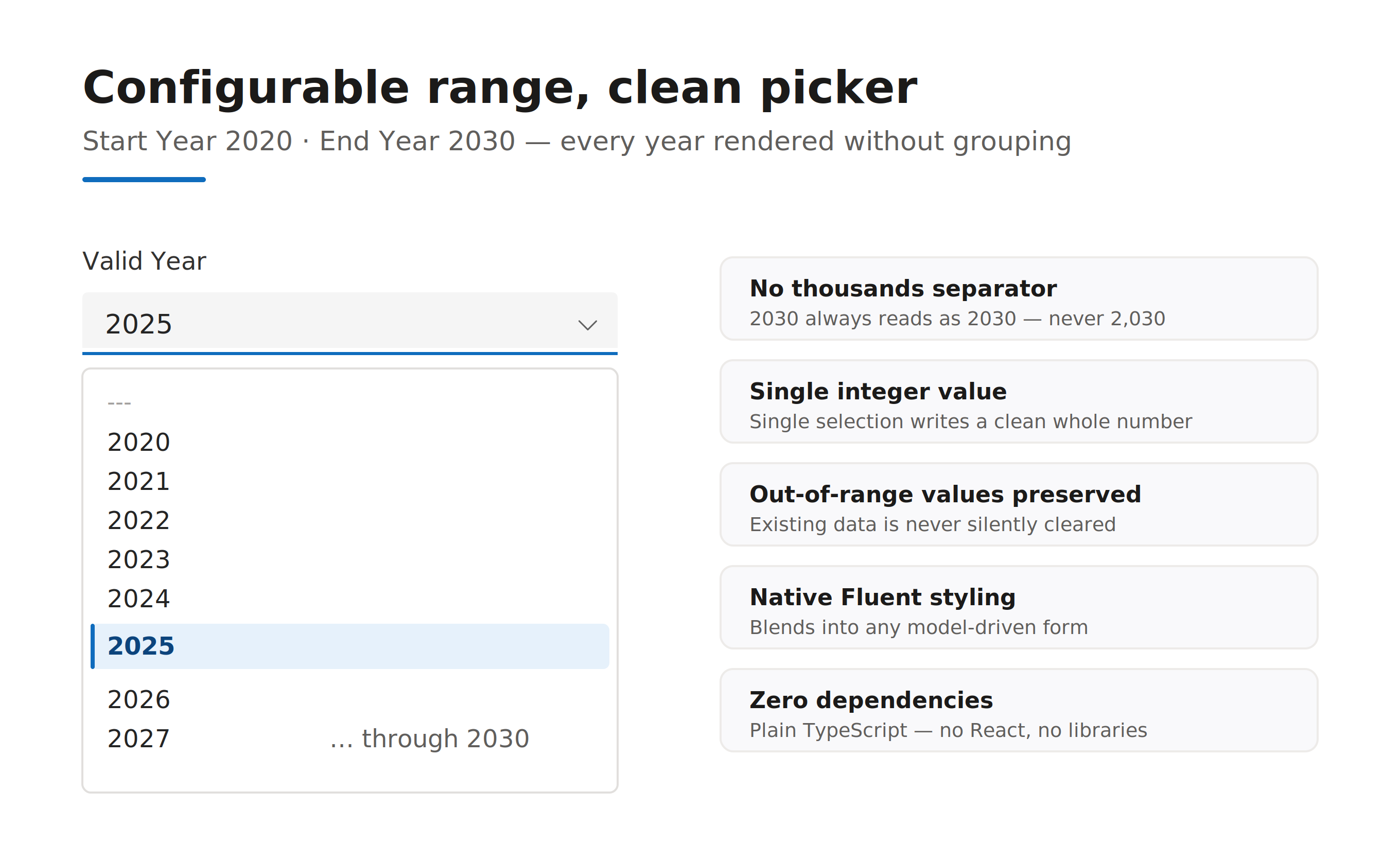
Number Year Selector is a free PCF control that replaces the plain number input on a Dynamics 365 or Power Apps Whole Number column with a year dropdown. When users type a year, the number format settings add a thousands separator, so 2030 appears as 2,030. This control builds one option per year from a Start Year and an End Year you define, users select a year instead of typing it, and the column receives a clean integer that always reads 2030. An existing value outside the range is kept as a selectable option rather than cleared. It is plain TypeScript with zero dependencies, styled like native Fluent fields, and suits fiscal, model, contract and expiry years.
What does Number Year Selector do?
Whole Number columns are the natural place to store a year, but they come with an awkward side effect: the moment a user types a value like 2030, Dynamics 365 applies the org's number-format settings and shows it as 2,030. A thousands separator makes sense for quantities and amounts - it makes no sense for a year. Year Selector replaces the plain number input with a configurable dropdown built from a Start Year and an End Year you define. It generates one option per year across the inclusive range, so users select a year instead of typing it, every option renders without grouping, and the field writes back a clean integer - 2030 always looks like 2030. Built in plain TypeScript with zero dependencies and styled to match native Fluent fields, it drops into any model-driven form.
What problems does Number Year Selector solve?
Key benefits:
- Eliminates thousands-separator formatting on year fields - 2030 always reads as 2030, never 2,030
- Configurable range via two integer parameters, Start Year and End Year, that build the dropdown across the inclusive span
- Single selection only, so the bound Whole Number column keeps a clean integer value
- Preserves an existing out-of-range value as a selectable option instead of silently clearing data, and collapses to a single option when Start Year equals End Year
- Styled to match native Fluent fields - filled background, brand-accent focus underline, native chevron - with zero dependencies (no React, no external libraries)
Where can you use Number Year Selector?
What does Number Year Selector look like in use?
Browse through screenshots and watch the demo video
Download Number Year Selector
This control is free to use. No license required!
How do I install and configure Number Year Selector?
Setup takes a few minutes in the Power Apps maker portal. No code, no developer tools.
- 1
Get the solution package
- Download the Number Year Selector solution package (.zip) from this page. Keep it zipped: Power Apps imports the .zip as it is.
- 2
Import it into your environment
- Sign in to make.powerapps.com and pick the target environment in the top right corner.
- Open Solutions, select Import solution, choose Browse, pick the .zip and select Next, then Import.
- Wait for the "imported successfully" message. Importing needs the System Administrator or System Customizer role.
- 3
Add Number Year Selector to a form
- Open Tables, your table, Forms, and open the main form in the form designer.
- Select the Whole Number column that stores the year on the form. If it is not on the form yet, drag it in from Table columns first.
- In the Properties pane on the right, expand Components, select + Component and choose Number Year Selector. If it is not listed, select Get more components and add it from there.
- Set the properties below, tick where it should show (Web, Phone, Tablet) and select Done.
- 4
Save, publish and test
- Select Save and publish, then open a record. If the old control still shows, refresh the page with Ctrl+F5 to clear the cached form.
- To update later, import the newer .zip the same way. Power Apps upgrades the existing solution and keeps your form settings.
Which properties do I set?
| Property | What to set |
|---|---|
| Selected Yearrequired | The Whole Number column the chosen year is written to. |
| Start Yearrequired | The first year in the dropdown, for example 2020. |
| End Yearrequired | The last year in the dropdown, for example 2035. Must be the same as or later than Start Year. |
Good to know
- If Start Year is later than End Year the control stays inactive and logs the problem for the maker instead of showing an error to users.
- A saved year outside the range is kept as a selectable option, so existing data is never cleared.
Using Number Year Selector? Tell others how it works for you.
Once it has been on your forms for a while, a short review on Clutch about how the control performs helps other Dynamics 365 teams decide, and tells us what to improve next.
What do buyers ask about Number Year Selector?
Why does a year show as 2,030 in Dynamics 365?
Whole Number columns apply the organization's number format settings, which add a thousands separator. That suits quantities and amounts but not years. Number Year Selector shows years in a dropdown where no option is grouped, so 2030 always reads as 2030.
How do I set the range of years?
With two integer parameters, Start Year and End Year. The control generates one option per year across the inclusive range, and collapses to a single option when Start Year equals End Year.
What happens to a value that is outside the configured range?
It is preserved as a selectable option instead of being silently cleared, so existing data is not lost when you add the control or change the range.
Does Number Year Selector depend on React or other libraries?
No. It is built in plain TypeScript with zero dependencies, no React and no external libraries, and is styled to match native Fluent fields with a filled background, a brand accent focus underline and a native chevron.
Is Number Year Selector free, and how do I install it?
Yes, it is free to use and no licence is required. To install it, download the solution package (.zip) from this page, import it through Solutions in the Power Apps maker portal, then add the control to the field in the form editor, then set Start Year and End Year.
Which Solzet services go with Number Year Selector?
We recommend the right solution - whether that's Microsoft Dynamics 365, Power Platform, or a custom-built CRM. Some businesses need the Microsoft ecosystem. Others need full control without licensing. We deliver both.
PCF Controls Development - PowerApps Component Framework
PCF controls development for Dynamics 365 and Power Apps in TypeScript and React, with a guide to PCF vs JavaScript, the lifecycle and third party libraries.
Power Platform Consulting and Development Services
Power Platform consulting and development by senior Solzet developers: Power Apps, Power Automate and RPA, Power Pages, Copilot Studio, Dataverse and PCF.
Hire a Dynamics 365 Developer or CRM Developer in Armenia
Hire a senior Dynamics 365 developer or CRM developer from Solzet in Yerevan, Armenia: Dataverse, C# plugins, PCF controls, integrations and project rescue.
Need help implementing Number Year Selector?
Tell us how you want to use this control. A senior consultant replies within one business day about installing it, configuring it for your forms, or building a custom PCF control for a requirement it does not cover.