Solzet JSON Viewer
FreeTurn raw JSON into a clean, readable data card - built for non-technical users on Dynamics 365.
Solzet JSON Viewer is a free PCF control that turns raw JSON stored in a Dynamics 365 multiline text field into a clean, readable data card for non-technical users. API responses and integration payloads normally appear as brackets, quotes and nested objects that mean nothing to business users. JSON Viewer shows them as clearly labeled, collapsible sections with smart formatting for dates, numbers, currency, booleans and links. Users can search across all values, copy any field to the clipboard and switch between D365, Light and Dark themes. Labels can be overridden to match your business vocabulary with no code. It suits API integration records, support and case management, and integration monitoring.
What does Solzet JSON Viewer do?
API responses and integration payloads land in Multiline Text fields as raw JSON - brackets, quotes, and nested objects that mean nothing to business users. JSON Viewer renders that data as clearly labeled, collapsible sections with smart formatting for dates, numbers, currency, booleans, and links. Users can search across all values, copy any field to clipboard, and switch between D365, Light, and Dark themes. Human-readable labels can be overridden to match your business vocabulary - no code required.
What problems does Solzet JSON Viewer solve?
JSON Viewer solves real usability challenges:
- Unreadable raw data: Business users see structured, labeled cards instead of walls of JSON brackets and quotes
- Hidden context: Collapsible nested sections let users expand only what they need, keeping the form clean
- Manual data hunting: Built-in search across all fields and copy-to-clipboard eliminate error-prone manual lookup
- Inconsistent presentation: Smart auto-formatting for dates, numbers, currency, booleans, and URLs ensures data always looks professional
- Branding misalignment: D365, Light, and Dark themes plus custom label overrides match your organization's look and language
Where can you use Solzet JSON Viewer?
What does Solzet JSON Viewer look like in use?
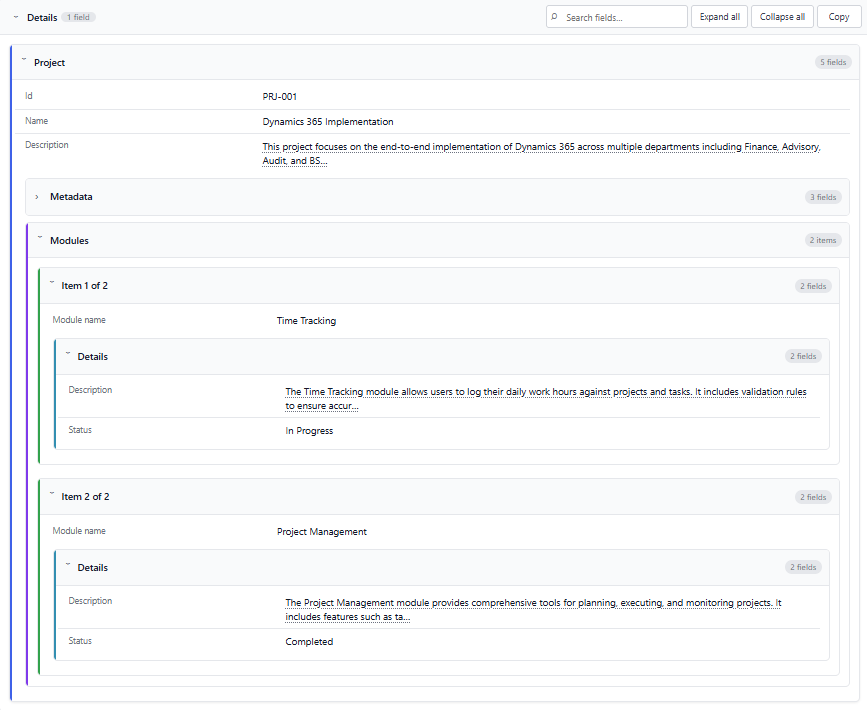
Watch the demo to see Solzet JSON Viewer in action
Download Solzet JSON Viewer
This control is free to use. No license required!
How do I install and configure Solzet JSON Viewer?
Setup takes a few minutes in the Power Apps maker portal. No code, no developer tools.
- 1
Get the solution package
- Download the Solzet JSON Viewer solution package (.zip) from this page. Keep it zipped: Power Apps imports the .zip as it is.
- 2
Import it into your environment
- Sign in to make.powerapps.com and pick the target environment in the top right corner.
- Open Solutions, select Import solution, choose Browse, pick the .zip and select Next, then Import.
- Wait for the "imported successfully" message. Importing needs the System Administrator or System Customizer role.
- 3
Add Solzet JSON Viewer to a form
- Open Tables, your table, Forms, and open the main form in the form designer.
- Select the Multiple lines of text column that holds the JSON on the form. If it is not on the form yet, drag it in from Table columns first.
- In the Properties pane on the right, expand Components, select + Component and choose Solzet JSON Viewer. If it is not listed, select Get more components and add it from there.
- Set the properties below, tick where it should show (Web, Phone, Tablet) and select Done.
- 4
Save, publish and test
- Select Save and publish, then open a record. If the old control still shows, refresh the page with Ctrl+F5 to clear the cached form.
- To update later, import the newer .zip the same way. Power Apps upgrades the existing solution and keeps your form settings.
Which properties do I set?
| Property | What to set |
|---|---|
| JSON Valuerequired | The Multiple lines of text column containing the JSON string to display. |
| Theme | Dynamics 365 (default), Light or Dark. |
| Initial State | Whether sections start Expanded or Collapsed. |
| Max Height (px) | Maximum height of the data area in pixels. 0 means no limit. |
| Label Style | How JSON keys become labels: Humanize (default, orderId becomes Order id), Title Case, Sentence case or As-is. |
| Label Overrides | JSON that renames specific keys, for example {"orderId":"Order #","customerId":"Account"}. |
| Boolean Style | Show true/false values as Yes / No (default), check marks, or True / False. |
| Locale | Locale for numbers and dates, for example en-US or de-DE. Leave blank to follow the browser. |
| Currency Code | Currency such as USD or EUR. When set, money keys like price, amount and total are shown as currency. |
Using Solzet JSON Viewer? Tell others how it works for you.
Once it has been on your forms for a while, a short review on Clutch about how the control performs helps other Dynamics 365 teams decide, and tells us what to improve next.
What do buyers ask about Solzet JSON Viewer?
What does Solzet JSON Viewer do?
It renders JSON held in a Multiline Text field as a readable data card: clearly labeled, collapsible sections with smart formatting for dates, numbers, currency, booleans and links, instead of a wall of brackets and quotes.
Who is JSON Viewer designed for?
Non-technical business users who need to read integration data on a Dynamics 365 record, for example on API integration records, in support and case management, or when reviewing integration monitoring data.
Can users search and copy values in the JSON?
Yes. Built-in search runs across all values, and any field can be copied to the clipboard, which removes error-prone manual lookup through nested data.
Can I change the labels and the look of the data card?
Yes. Human-readable labels can be overridden to match your business vocabulary without code, and users can switch between D365, Light and Dark themes.
Is JSON Viewer free, and how do I install it?
Yes, it is free to use and no licence is required. To install it, download the solution package (.zip) from this page, import it through Solutions in the Power Apps maker portal, then add the control to the field in the form editor.
Which Solzet services go with Solzet JSON Viewer?
We recommend the right solution - whether that's Microsoft Dynamics 365, Power Platform, or a custom-built CRM. Some businesses need the Microsoft ecosystem. Others need full control without licensing. We deliver both.
PCF Controls Development - PowerApps Component Framework
PCF controls development for Dynamics 365 and Power Apps in TypeScript and React, with a guide to PCF vs JavaScript, the lifecycle and third party libraries.
Power Platform Consulting and Development Services
Power Platform consulting and development by senior Solzet developers: Power Apps, Power Automate and RPA, Power Pages, Copilot Studio, Dataverse and PCF.
Hire a Dynamics 365 Developer or CRM Developer in Armenia
Hire a senior Dynamics 365 developer or CRM developer from Solzet in Yerevan, Armenia: Dataverse, C# plugins, PCF controls, integrations and project rescue.
Need help implementing Solzet JSON Viewer?
Tell us how you want to use this control. A senior consultant replies within one business day about installing it, configuring it for your forms, or building a custom PCF control for a requirement it does not cover.