Solzet Easy Audit
FreeAudit history for Dynamics 365, made readable - what changed, when, by whom, and how a value got to where it is.
Solzet Easy Audit is a free PCF control that makes Dynamics 365 audit history readable: what changed, when, by whom, and how a value got to where it is. It replaces the flat native audit grid with a side panel over the record, reading the same Dataverse audit data. Table view sorts on every column and groups changes saved in the same transaction. Progress view lays a field out as a lane from its first value to its current one, with the user and time on every step. Filters, field search, copy buttons and CSV export make audit questions quick to answer. The control only reads audit history and makes no external network calls.
What does Solzet Easy Audit do?
The native audit history tab on a model-driven form is a flat grid: no grouping, no search, and no way to follow a single field over time. Solzet Easy Audit is a PCF control that replaces it with a side panel opening over the record you are already looking at. It reads the same Dataverse audit data and presents it two ways. Table view keeps the familiar columns - Changed Date with both the timestamp and a relative time, Changed By, Event, Changed Field, Old Value and New Value - makes every column sortable, and gives the rows saved in the same transaction a shared visual group so you can see which fields moved together. Progress view turns one or more fields into horizontal lanes, oldest change on the left through to the current value on the right, with the value, the time and the user on every step - so questions the native grid cannot answer, like when a status was first set, how many times it bounced, and who moved it each time, finally have one. Filters for date range, change kind, user and field are built from the record's own history, so you never pick a filter with nothing behind it; field search narrows the list after two or three letters, copy buttons put any field name, old value or new value on the clipboard in full, and CSV export writes either the current filtered view or everything loaded as UTF-8 with BOM, so Excel opens it correctly. Highlighted fields pin the columns your team cares about to a strip at the top of the panel, and who may change that set is controlled by security role name rather than GUID, so it ports across every environment. The panel opens from a handle on the right edge of the form, renders inline in a form section, or both, at a configurable width - and in side panel mode it collapses its own form slot to nothing, so it takes no space on the form. It follows the host theme including dark mode, and ships in English and Danish. Nothing is written back: the control only reads audit history, makes no external network calls, and sends every request to your own Dataverse environment - no telemetry, no analytics, no external fonts or icons.
What problems does Solzet Easy Audit solve?
Easy Audit solves the everyday problems of the native audit tab:
- A flat grid with no grouping and no search: the native tab lists every change in one undifferentiated list - Easy Audit sorts on every column, groups the changes saved in the same transaction, and narrows the field list as you type
- "How did this value get here?": Progress view lays a single field out as a lane from its first value through to its current one, showing when a status was first set, how many times it bounced, and who moved it at each step
- Answering an audit question means scrolling: filters by date range, change kind, user and field are built from the record's actual history, so every option you can pick has events behind it - and the panel always states how much of the total history it currently covers, loading more on request
- Getting the evidence out is manual: one-click copy on any field name, old value or new value, plus CSV export of the current filtered view or everything loaded, written as UTF-8 with BOM so Excel opens it correctly
- Audit history steals the record: the panel opens from a handle on the right edge over the form you are already reading, at a configurable width, and collapses its own form slot to nothing in side panel mode - or renders inline in a section instead, whichever suits the form
Where can you use Solzet Easy Audit?
What does Solzet Easy Audit look like in use?
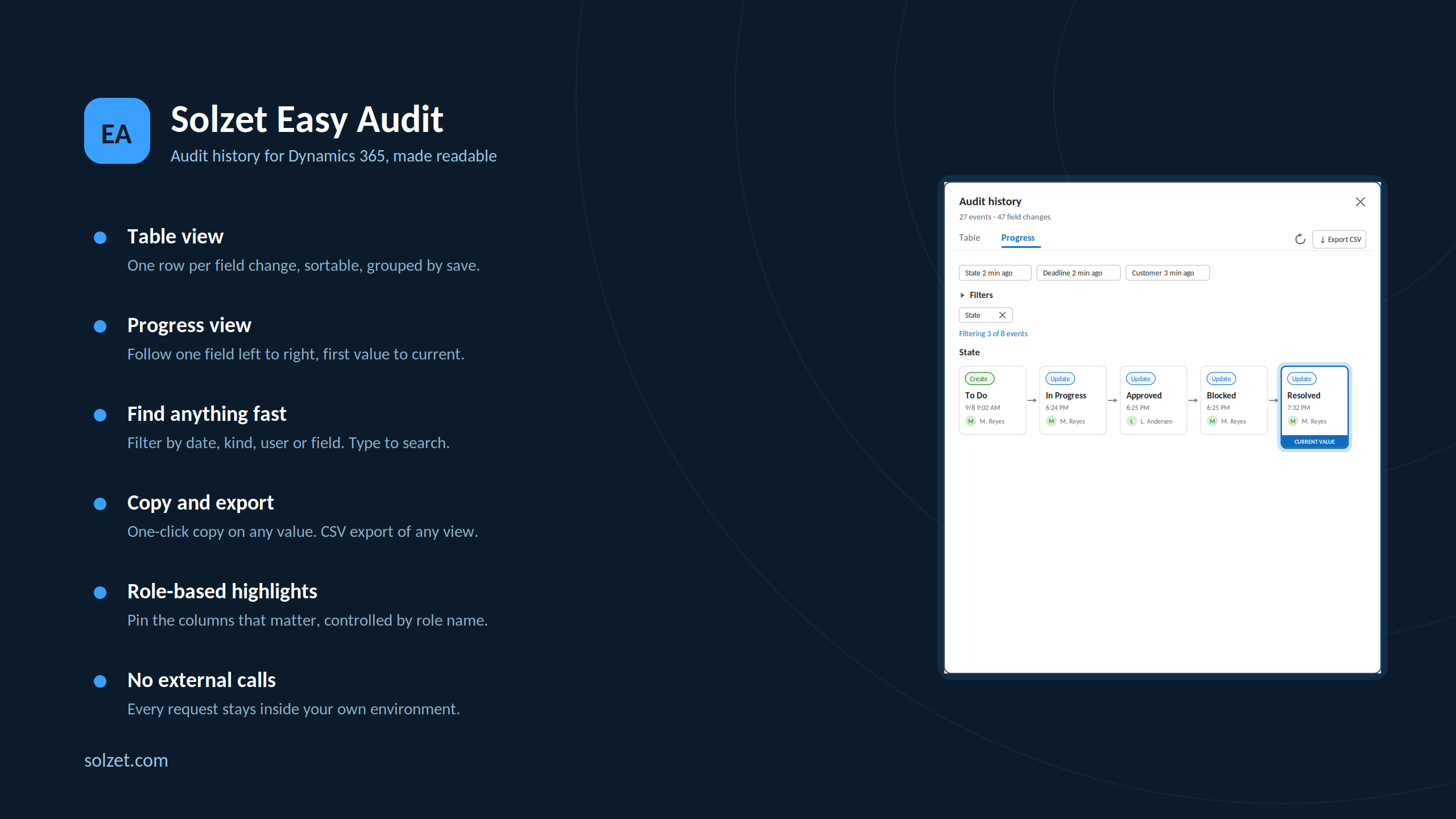
Browse through screenshots and watch the demo video
Download Solzet Easy Audit
This control is free to use. No license required!
How do I install and configure Solzet Easy Audit?
Setup takes a few minutes in the Power Apps maker portal. No code, no developer tools.
- 1
Get the solution package
- Download the Solzet Easy Audit solution package (.zip) from this page. Keep it zipped: Power Apps imports the .zip as it is.
- 2
Import it into your environment
- Sign in to make.powerapps.com and pick the target environment in the top right corner.
- Open Solutions, select Import solution, choose Browse, pick the .zip and select Next, then Import.
- Wait for the "imported successfully" message. Importing needs the System Administrator or System Customizer role.
- 3
Check the prerequisites
- Auditing switched on at all three levels: the environment, the table and the columns you want to see. If one is off, the panel says which.
- View Audit History and View Audit Summary privileges on the audited tables, for every security role that will use the control.
- Read access to the Environment Variable Definition and Environment Variable Value tables for those roles, plus write access to Environment Variable Value for the roles allowed to change highlights.
- 4
Add Solzet Easy Audit to a form
- Open Tables, your table, Forms, and open the main form in the form designer.
- Select any text column, for example Subject, in a visible section on the first tab of the form on the form. If it is not on the form yet, drag it in from Table columns first.
- In the Properties pane on the right, expand Components, select + Component and choose Solzet Easy Audit. If it is not listed, select Get more components and add it from there.
- Set the properties below, tick where it should show (Web, Phone, Tablet) and select Done.
- 5
Save, publish and test
- Select Save and publish, then open a record. If the old control still shows, refresh the page with Ctrl+F5 to clear the cached form.
- To update later, import the newer .zip the same way. Power Apps upgrades the existing solution and keeps your form settings.
Which properties do I set?
| Property | What to set |
|---|---|
| Anchor columnrequired | The text column the control sits on. Its value is never read, written or shown. |
| Display mode | Side panel (the default, opened from a handle on the right edge), Inline on form, or Both. |
| Panel title | Text on the edge handle and the panel header. Default Audit history. |
| Panel width (%) | Side panel width as a percentage of the browser, 25-90. Default 50. |
| Highlighted fields | Column logical names, comma separated, pinned to the top of the panel, for example statuscode,ownerid. |
| Roles that may change highlights | Security role names, comma separated, for example System Administrator. Leave empty to make highlights read-only for everyone. |
| Default date range | The date filter the panel opens with: All (default), Last 7, 30 or 90 days. |
| Enable CSV export | Set to No when audit data must not leave the browser. Default Yes. |
Good to know
- In side panel mode the control takes no space on the form, so the anchor column effectively disappears from view.
- The control only reads audit history. It never changes or deletes audit records and makes no external calls.
How is Solzet Easy Audit working for you?
Tell others how it works for you. Once it has been on your forms for a while, a short review on Clutch about how the control performs helps other Dynamics 365 teams decide, and tells us what to improve next.
What do buyers ask about Solzet Easy Audit?
What does Solzet Easy Audit do?
It replaces the native audit history tab on a model-driven form with a readable panel built on the same Dataverse audit data. Table view shows each change with sortable columns and transaction grouping, and Progress view shows how one or more fields changed over time, step by step.
How is Easy Audit different from the native audit history tab?
The native tab is a flat grid with no grouping, no search and no way to follow a single field over time. Easy Audit sorts on every column, groups changes saved together, narrows the field list as you type, and answers questions like when a status was first set, how many times it bounced and who moved it each time.
Does Easy Audit change data or send it anywhere?
No. Nothing is written back: the control only reads audit history, makes no external network calls and sends every request to your own Dataverse environment. There is no telemetry, no analytics and no external fonts or icons.
Can I export audit history to Excel?
Yes. CSV export writes either the current filtered view or everything loaded, as UTF-8 with BOM so Excel opens it correctly. Copy buttons also put any field name, old value or new value on the clipboard in full.
Where does the audit panel appear on the form?
It opens from a handle on the right edge of the form as a side panel at a configurable width, renders inline in a form section, or both. In side panel mode it collapses its own form slot so it takes no space on the form. It follows the host theme including dark mode and ships in English and Danish.
Is Easy Audit free, and how do I install it?
Yes, it is free to use and no licence is required. Download the solution package (.zip) from this page, import it through Solutions in the Power Apps maker portal, then add the control to your form.
Which Solzet services go with Solzet Easy Audit?
We recommend the right solution - whether that's Microsoft Dynamics 365, Power Platform, or a custom-built CRM. Some businesses need the Microsoft ecosystem. Others need full control without licensing. We deliver both.
PCF Controls Development - PowerApps Component Framework
PCF controls development for Dynamics 365 and Power Apps in TypeScript and React, with a guide to PCF vs JavaScript, the lifecycle and third party libraries.
Power Platform Consulting and Development Services
Power Platform consulting and development by senior Solzet developers: Power Apps, Power Automate and RPA, Power Pages, Copilot Studio, Dataverse and PCF.
Hire a Dynamics 365 Developer or CRM Developer in Armenia
Hire a senior Dynamics 365 developer or CRM developer from Solzet in Yerevan, Armenia: Dataverse, C# plugins, PCF controls, integrations and project rescue.
Need help implementing Solzet Easy Audit?
Tell us how you want to use this control. A senior consultant replies within one business day about installing it, configuring it for your forms, or building a custom PCF control for a requirement it does not cover.