Column-Info Text
FreeShow contextual, value-driven help text under any Dynamics 365 form field - without replacing the native control.
Column-Info Text is a free controller PCF control for Dynamics 365 model-driven apps that shows contextual, colored guidance under native form fields when their value matches a rule you define. You list the fields and the info text for each exact value in a simple JSON configuration, and the control adds a styled info block beneath each matching field. Choice, text, currency and number fields stay fully native and editable; only the help text is added. Each block supports custom background and text colors, optional wrapping, truncation with hover to reveal, and optional deduplication. It replaces form scripts for status warnings, tier guidance, threshold alerts and data entry instructions, and is free to download.
What does Column-Info Text do?
Model-driven forms often need inline guidance that depends on what the user actually selected - a warning for a certain status, an instruction for a specific tier, or a note when a numeric threshold is reached. Column-Info Text is a controller PCF control that reads a simple JSON configuration listing one or more fields and the info text to display for each exact value. It watches field values and visibility on the form through Xrm and injects styled info blocks directly beneath each field's native control in the DOM. Choice, text, currency, and number fields stay completely native and editable - only the contextual help text is added below. Each info block supports custom background and text colors, optional text wrapping, truncation with hover-to-reveal for long messages, and optional deduplication when several selected values would show the same note.
What problems does Column-Info Text solve?
Column-Info Text solves everyday model-driven form challenges:
- No inline guidance out of the box: Native Dynamics 365 fields cannot show conditional help, so users guess what a status, tier, or amount means - Column-Info Text shows the right message for the exact selected value
- Replacing fields is heavy-handed: Other approaches re-host or replace the control; this leaves choice, text, and numeric fields fully native and editable and only adds styled text below
- JavaScript maintenance overhead: Instead of writing and maintaining form scripts, you define fields, values, and messages in one JSON config - colors, wrapping, and truncation included
- Cluttered, repetitive messaging: Custom background and text colors make warnings and instructions scannable, while optional deduplication avoids repeating the same note across multiple selected values
Where can you use Column-Info Text?
What does Column-Info Text look like in use?
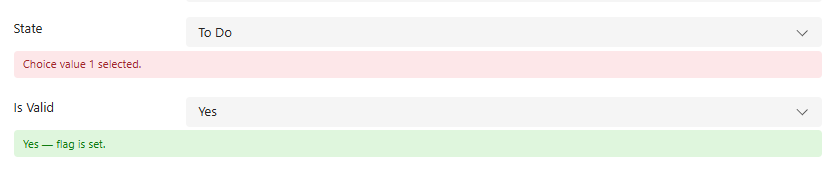
Browse through screenshots and watch the demo video
Download Column-Info Text
This control is free to use. No license required!
How do I install and configure Column-Info Text?
Setup takes a few minutes in the Power Apps maker portal. No code, no developer tools.
- 1
Get the solution package
- Download the Column-Info Text solution package (.zip) from this page. Keep it zipped: Power Apps imports the .zip as it is.
- 2
Import it into your environment
- Sign in to make.powerapps.com and pick the target environment in the top right corner.
- Open Solutions, select Import solution, choose Browse, pick the .zip and select Next, then Import.
- Wait for the "imported successfully" message. Importing needs the System Administrator or System Customizer role.
- 3
Add Column-Info Text to a form
- Open Tables, your table, Forms, and open the main form in the form designer.
- Select a Multiple lines of text column to act as the anchor for the control (its value is not used for the messages) on the form. If it is not on the form yet, drag it in from Table columns first.
- In the Properties pane on the right, expand Components, select + Component and choose Column-Info Text. If it is not listed, select Get more components and add it from there.
- Set the properties below, tick where it should show (Web, Phone, Tablet) and select Done.
- 4
Save, publish and test
- Select Save and publish, then open a record. If the old control still shows, refresh the page with Ctrl+F5 to clear the cached form.
- To update later, import the newer .zip the same way. Power Apps upgrades the existing solution and keeps your form settings.
Which properties do I set?
| Property | What to set |
|---|---|
| Anchor | The column the control sits on. It only hosts the control; the messages appear under the fields named in the configuration. |
| Config JSON | The rules, as JSON: { "fields": [ { "field": "<column logical name>", "options": [ { "value": <value>, "info": "<message>", "background": "<color>" } ] } ] }. Optional per field: type, dedupe, wrap, maxLength. Optional per option: textColor, wrap, maxLength. |
Good to know
- Write values the way the column stores them: a number for choice, multi-select and yes/no columns (0 or 1 for yes/no), plain text for text columns (matched without case), a dot decimal such as 0.5 for number and currency columns, and YYYY-MM-DD for dates.
- The column type is detected automatically; set type only if you want to force it.
- Messages appear under fields that are on the same form as the control, so keep the referenced fields on that form.
Using Column-Info Text? Tell others how it works for you.
Once it has been on your forms for a while, a short review on Clutch about how the control performs helps other Dynamics 365 teams decide, and tells us what to improve next.
What do buyers ask about Column-Info Text?
What does Column-Info Text do?
It shows contextual help text under native Dynamics 365 form fields when their current value matches a rule you define, such as a warning for a certain status, an instruction for a specific tier, or a note when a numeric threshold is reached.
Does Column-Info Text replace my form fields?
No. It is a controller control. It watches field values and visibility on the form through Xrm and adds styled info blocks beneath each field's native control. Choice, text, currency and number fields stay completely native and editable.
How do I configure the messages?
In one JSON configuration that lists the fields and the info text to display for each exact value. Colors, wrapping and truncation are set there too, so there are no form scripts to write and maintain.
Can I style the messages and avoid repeated notes?
Yes. Each info block supports custom background and text colors, optional text wrapping, and truncation with hover to reveal for long messages. Optional deduplication avoids showing the same note several times when multiple selected values would produce it.
Is Column-Info Text free, and how do I install it?
Yes, it is free to use and no licence is required. Download the solution package (.zip) from this page, import it through Solutions in the Power Apps maker portal, then add the control to your form and provide the JSON configuration.
Which Solzet services go with Column-Info Text?
We recommend the right solution - whether that's Microsoft Dynamics 365, Power Platform, or a custom-built CRM. Some businesses need the Microsoft ecosystem. Others need full control without licensing. We deliver both.
PCF Controls Development - PowerApps Component Framework
PCF controls development for Dynamics 365 and Power Apps in TypeScript and React, with a guide to PCF vs JavaScript, the lifecycle and third party libraries.
Power Platform Consulting and Development Services
Power Platform consulting and development by senior Solzet developers: Power Apps, Power Automate and RPA, Power Pages, Copilot Studio, Dataverse and PCF.
Hire a Dynamics 365 Developer or CRM Developer in Armenia
Hire a senior Dynamics 365 developer or CRM developer from Solzet in Yerevan, Armenia: Dataverse, C# plugins, PCF controls, integrations and project rescue.
Need help implementing Column-Info Text?
Tell us how you want to use this control. A senior consultant replies within one business day about installing it, configuring it for your forms, or building a custom PCF control for a requirement it does not cover.