Solzet Colored OptionSet
FreeSee your choices at a glance - instantly recognize the status of any record by color.
Solzet Colored OptionSet is a free PCF control that displays Dynamics 365 choice fields in the color defined on each option, so users recognize the status of a record at a glance. The standard form shows a choice as plain text or a simple dropdown, which is hard to scan when users need to understand the state of a record quickly. This control renders each selected value with its associated color and works with both single select (choice) and multi-select (choices) fields. It uses the color already configured on each option, so there is no extra setup: add the control to the field and it works. It suits status, stage, priority, category and approval fields.
What does Solzet Colored OptionSet do?
Choice fields in Dynamics 365 carry important status information - but the standard form shows them as plain text or a simple dropdown. When users need to quickly scan and understand the state of a record, plain labels aren't enough. ColoredOptionSet brings your choice field options to life by displaying them in the color defined on each option. Whether it's a single or multi-select choice field, each selected value is rendered with its associated color - making statuses, categories, and priorities visually immediately clear.
What problems does Solzet Colored OptionSet solve?
Key benefits:
- Works with both single select and multi-select (choice and choices) fields
- Uses the standard color already configured on each choice option - no extra setup needed
- Improves scannability and reduces cognitive load for users
- No configuration overhead - just add the control to the field and it works
Where can you use Solzet Colored OptionSet?
What does Solzet Colored OptionSet look like in use?
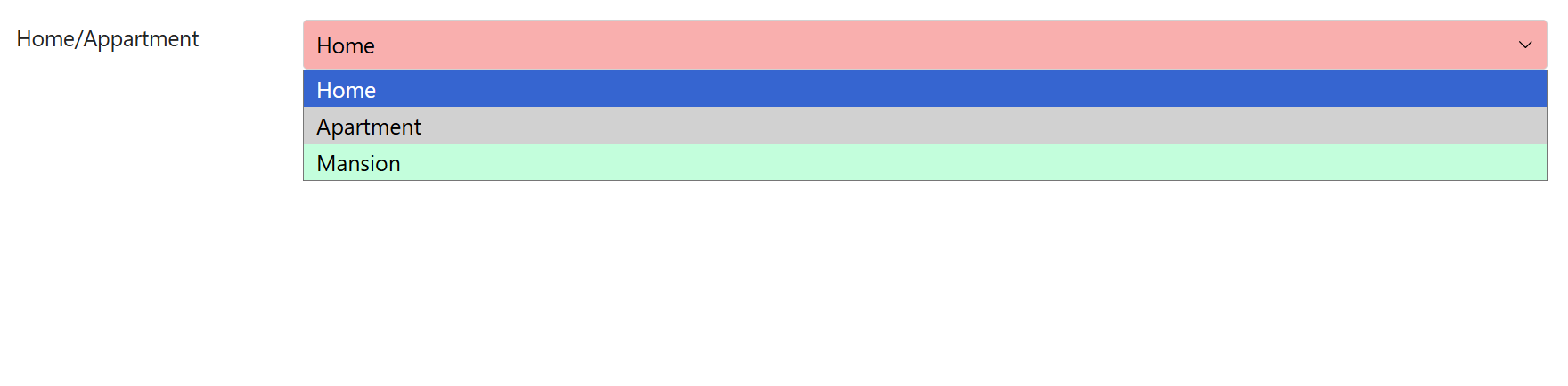
Browse through screenshots and watch the demo video
Download Solzet Colored OptionSet
This control is free to use. No license required!
How do I install and configure Solzet Colored OptionSet?
Setup takes a few minutes in the Power Apps maker portal. No code, no developer tools.
- 1
Get the solution package
- Download the Solzet Colored OptionSet solution package (.zip) from this page. Keep it zipped: Power Apps imports the .zip as it is.
- 2
Import it into your environment
- Sign in to make.powerapps.com and pick the target environment in the top right corner.
- Open Solutions, select Import solution, choose Browse, pick the .zip and select Next, then Import.
- Wait for the "imported successfully" message. Importing needs the System Administrator or System Customizer role.
- 3
Check the prerequisites
- Give each option a color in the column definition: Tables, your table, Columns, open the choice column and set the color on each option. The control shows exactly those colors.
- 4
Add Solzet Colored OptionSet to a form
- Open Tables, your table, Forms, and open the main form in the form designer.
- Select a Choice or Choices (multi-select) column on the form. If it is not on the form yet, drag it in from Table columns first.
- In the Properties pane on the right, expand Components, select + Component and choose Solzet Colored OptionSet. If it is not listed, select Get more components and add it from there.
- Set the properties below, tick where it should show (Web, Phone, Tablet) and select Done.
- 5
Save, publish and test
- Select Save and publish, then open a record. If the old control still shows, refresh the page with Ctrl+F5 to clear the cached form.
- To update later, import the newer .zip the same way. Power Apps upgrades the existing solution and keeps your form settings.
Which properties do I set?
| Property | What to set |
|---|---|
| Option Set Fieldrequired | The Choice or Choices column to display. Nothing else to configure. |
Using Solzet Colored OptionSet? Tell others how it works for you.
Once it has been on your forms for a while, a short review on Clutch about how the control performs helps other Dynamics 365 teams decide, and tells us what to improve next.
What do buyers ask about Solzet Colored OptionSet?
What does Solzet Colored OptionSet do?
It displays the selected values of a Dynamics 365 choice field in the color defined on each option, so statuses, categories and priorities are visually clear instead of appearing as plain text or a simple dropdown.
Does Colored OptionSet work with multi-select choice fields?
Yes. It works with both single select and multi-select fields, that is choice and choices columns. Each selected value is rendered with its own color.
Where do the colors come from?
From the standard color already configured on each choice option. There is no separate color configuration to maintain: add the control to the field and it uses the colors you have set.
Which fields benefit most from colored choices?
Status or stage fields, priority fields, category tags and approval states, where users scan many records and need to recognize a value immediately. Color improves scannability and reduces cognitive load.
Is Colored OptionSet free, and how do I install it?
Yes, it is free to use and no licence is required. To install it, download the solution package (.zip) from this page, import it through Solutions in the Power Apps maker portal, then add the control to the field in the form editor.
Which Solzet services go with Solzet Colored OptionSet?
We recommend the right solution - whether that's Microsoft Dynamics 365, Power Platform, or a custom-built CRM. Some businesses need the Microsoft ecosystem. Others need full control without licensing. We deliver both.
PCF Controls Development - PowerApps Component Framework
PCF controls development for Dynamics 365 and Power Apps in TypeScript and React, with a guide to PCF vs JavaScript, the lifecycle and third party libraries.
Power Platform Consulting and Development Services
Power Platform consulting and development by senior Solzet developers: Power Apps, Power Automate and RPA, Power Pages, Copilot Studio, Dataverse and PCF.
Hire a Dynamics 365 Developer or CRM Developer in Armenia
Hire a senior Dynamics 365 developer or CRM developer from Solzet in Yerevan, Armenia: Dataverse, C# plugins, PCF controls, integrations and project rescue.
Need help implementing Solzet Colored OptionSet?
Tell us how you want to use this control. A senior consultant replies within one business day about installing it, configuring it for your forms, or building a custom PCF control for a requirement it does not cover.